OpenStack環境構築メモ(DBクラスタセットアップ)
リンク元ページ
pikesaku.hatenablog.com
コントローラ基本セットアップ実施後に、以下作業をコントローラ3台に実施する。
①MariaDBセットアップ
$ sudo apt-key adv --recv-keys --keyserver hkp://keyserver.ubuntu.com:80 0xF1656F24C74CD1D8
$ sudo add-apt-repository 'deb [arch=amd64,i386,ppc64el] http://ftp.yz.yamagata-u.ac.jp/pub/dbms/mariadb/repo/10.2/ubuntu xenial main'
$ sudo apt update
$ sudo apt -y install mariadb-server python-pymysql
③設定ファイル編集
以下ファイルを新規に作成
/etc/mysql/mariadb.conf.d/galera.cnf
※bind-address, wsrep_node_address, wsrep_node_nameはノード毎に適宜変更
※bind-addressを0.0.0.0はNG。後で設定するHAProxy・PacemakerのVIP設定をすると起動しなくなる。
Nov 04 14:35:46 cnt3 mysqld[1836]: 2017-11-04 14:35:44 140114370193600 [ERROR] Can't start server: listen() on TCP/IP port: Address already in use
Nov 04 14:35:46 cnt3 mysqld[1836]: 2017-11-04 14:35:44 140114370193600 [ERROR] listen() on TCP/IP failed with error 98
Nov 04 14:35:46 cnt3 mysqld[1836]: 2017-11-04 14:35:44 140114370193600 [ERROR] Aborting'
galera.cnf内容
[galera]
bind-address = 192.168.1.51
max_connections	= 4096
collation_server = utf8mb4_general_ci
character_set_server = utf8mb4
binlog_format = row

wsrep_on = ON
wsrep_provider = "/usr/lib/libgalera_smm.so"
wsrep_provider_options = "pc.recovery=TRUE;gcache.size=300M"
wsrep_cluster_name = mycluster
wsrep_cluster_address = "gcomm://192.168.1.51,192.168.1.52,192.168.1.53"
wsrep_sst_method = rsync
wsrep_node_address = 192.168.1.51
wsrep_node_name = cnt1
wsrep_slave_threads = 1

default_storage_engine = InnoDB
innodb_flush_log_at_trx_commit = 0
innodb_autoinc_lock_mode = 2
innodb_file_per_table = on
④1号機でサービス起動
$ sudo galera_new_cluster
⑤2,3号機でサービス起動
$ sudo systemctl start mariadb
⑥クラスタ確認
3台のコントローラで以下コマンド実行。valueが3であることを確認。
$ mysql -uroot -p[DB_PASSWORD] -e "SHOW STATUS LIKE 'wsrep_cluster_size';"
+--------------------+-------+
| Variable_name      | Value |
+--------------------+-------+
| wsrep_cluster_size | 3     |
+--------------------+-------+
補足
システム起動時はサービス起動に失敗する。以下作業が必要。
①一番最後に停止したサーバで以下コマンドを実行
$ sudo galera_new_cluster
②他サーバで以下コマンドを実行
$ sudo systemctl start mariadb
※一番最後に停止してないサーバで、galera_new_clusterを実行するとエラーになる。ログメッセージは以下。
WSREP: It may not be safe to bootstrap the cluster from this node. It was not the last one to leave the cluster and may not contain all the updates. To force cluster bootstrap with this node, edit the grastate.dat file manually and set safe_to_bootstrap to 1 .
※3台のサーバを同時に停止すると、一番最後に停止したサーバでgalera_new_clusterを実行しても上記エラーになる。この場合は、ログに従い/var/lib/mysql/grastate.datのsafe_to_bootstrapパラメタを1にして、再度galera_new_clusterを実行する。
OpenStack環境構築メモ(コントローラ基本セットアップ)
参考URL
OpenStack Docs: OpenStack Installation Guide
以下作業をUbuntu 16.04LTS最小インストール後のコントローラ3台に実施する。
①apparmor無効化
$ sudo systemctl stop apparmor.service
$ sudo systemctl disable apparmor.service
$ sudo shutdown -r now
②NW設定
/etc/network/interfaces
※ipaddressはノード毎に適宜変更
source /etc/network/interfaces.d/*

auto lo
iface lo inet loopback

auto ens3
iface ens3 inet static
address 192.168.0.51
netmask 255.255.255.0
gateway 192.168.0.1
dns-nameservers 192.168.0.1

auto ens9
iface ens9 inet static
address 192.168.1.51
netmask 255.255.255.0
/etc/hostname
※ノード毎に適宜変更
$ cnt1
設定ファイル変更し再起動(networklingサービス再起動では反映されない。以下URL参照)
Ubuntuでネットワーク設定の変更をする - Qiita
③OpenSSHセットアップ
$ sudo apt install openssh-server
④時刻同期設定
$ sudo apt -y install chrony
$ sudo systemctl disable systemd-timesyncd
$ sudo systemctl enable chrony
$ sudo shutdown -r now
再起動後、時刻同期確認
$ chronyc sources
⑤hostsファイル編集
/etc/hosts
127.0.0.1	localhost
192.168.1.50 cnt.local cnt
192.168.1.51 cnt1.local cnt1
192.168.1.52 cnt2.local cnt2
192.168.1.53 cnt3.local cnt3
192.168.1.61 nw1.local nw1
192.168.1.62 nw2.local nw2
192.168.1.71 cm1.local cm1
192.168.1.72 cm2.local cm2
192.168.1.1  nfs.local nfs

# The following lines are desirable for IPv6 capable hosts
::1     localhost ip6-localhost ip6-loopback
ff02::1 ip6-allnodes
ff02::2 ip6-allrouters
⑥OpenStackレポジトリ追加&パッケージ最新化&パッケージインストール
$ sudo add-apt-repository cloud-archive:pike
$ sudo apt update && sudo apt full-upgrade
$ sudo apt -y install python-openstackclient nfs-common  crudini apt-file
※apt-fileはyum provides同等機能を提供
kvmメモ(スナップショット)
2種類あり
外部スナップショット 現状スタンダード(?)
内部スナップショット 試験的
A.13. libvirt による外部スナップショット作成の回避策 - Red Hat Customer Portal
blog.etsukata.com
aptとapt-getの違い
6.2. aptitude、apt-get、apt コマンド
APT は巨大なプロジェクトで、当初の予定ではグラフィカルインターフェースを含んでいました。APT はライブラリに基づいており、そのライブラリにはコアアプリケーションが含まれています。apt-get は最初のコマンドラインベースフロントエンドで、APT プロジェクト内で開発されました。apt は APT から提供されているもう一つのコマンドラインベースフロントエンドで、apt-get の持っていた設計上のミスを克服しています。
Ubuntu 16.04LTSメモ(systemd起動処理)
chronyはsystemd未対応(サービスファイルがない。しかし自動起動する。原因を調査)
chronyインストール後の状況
systemd用サービスファイルがパッケージに含まれず
$ dpkg -L chrony | egrep system
$ systemctl list-unit-files | egrep chrony
$
再起動後、何故か起動している。
$ sudo chronyc sources
210 Number of sources = 4
MS Name/IP address         Stratum Poll Reach LastRx Last sample
===============================================================================
^- next.kkyy.me                  2   6   377     8  +5858us[+5858us] +/-  225ms
^- secure.opticnerve.asia        2   8   367   203  +3836us[+3836us] +/-  104ms
^+ mail.moe.cat                  2   7   377    72  +7065us[+7065us] +/-   32ms
^* ec2-54-64-6-78.ap-northea     2   8   377   957   +352us[ +178us] +/-   31ms
想定される原因
systemd未対応アプリがあった場合に、/etc/init.d配下のスクリプトを実行する仕組みあり。
alpha.mixi.co.jp
自動起動設定
$ sudo systemctl disable chrony
chrony.service is not a native service, redirecting to systemd-sysv-install
Executing /lib/systemd/systemd-sysv-install disable chrony
insserv: warning: current start runlevel(s) (empty) of script `chrony' overrides LSB defaults (2 3 4 5).
insserv: warning: current stop runlevel(s) (0 1 2 3 4 5 6) of script `chrony' overrides LSB defaults (0 1 6).

$ sudo systemctl enable chrony
chrony.service is not a native service, redirecting to systemd-sysv-install
Executing /lib/systemd/systemd-sysv-install enable chrony
insserv: warning: current start runlevel(s) (empty) of script `chrony' overrides LSB defaults (2 3 4 5).
insserv: warning: current stop runlevel(s) (0 1 2 3 4 5 6) of script `chrony' overrides LSB defaults (0 1 6)
警告は出るが設定はされる(動作確認済み)
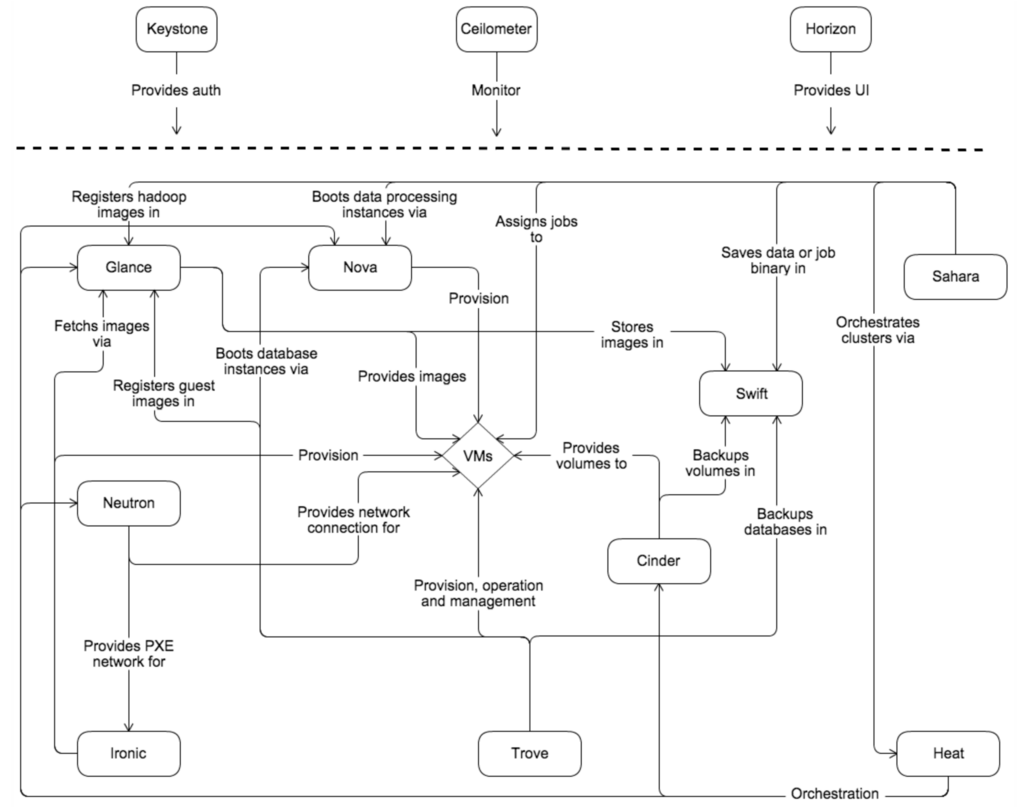

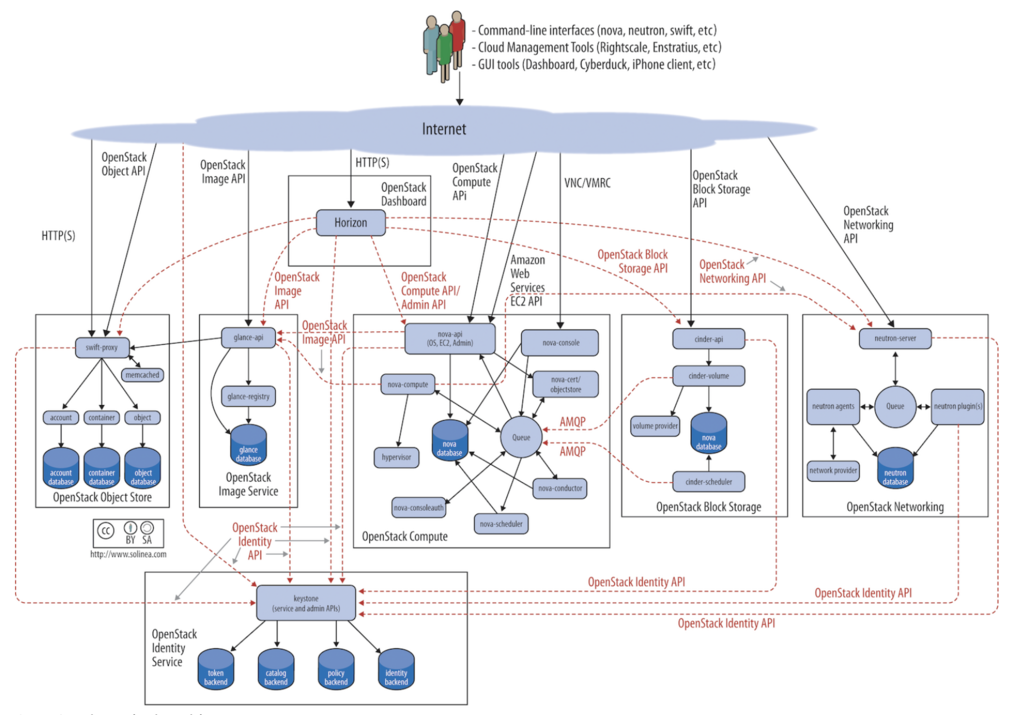
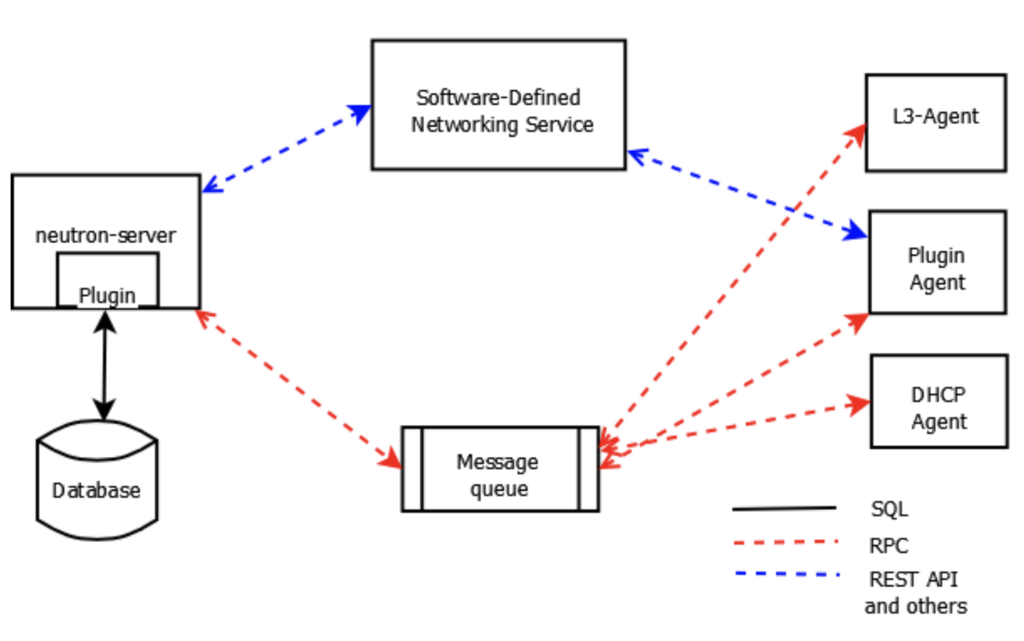
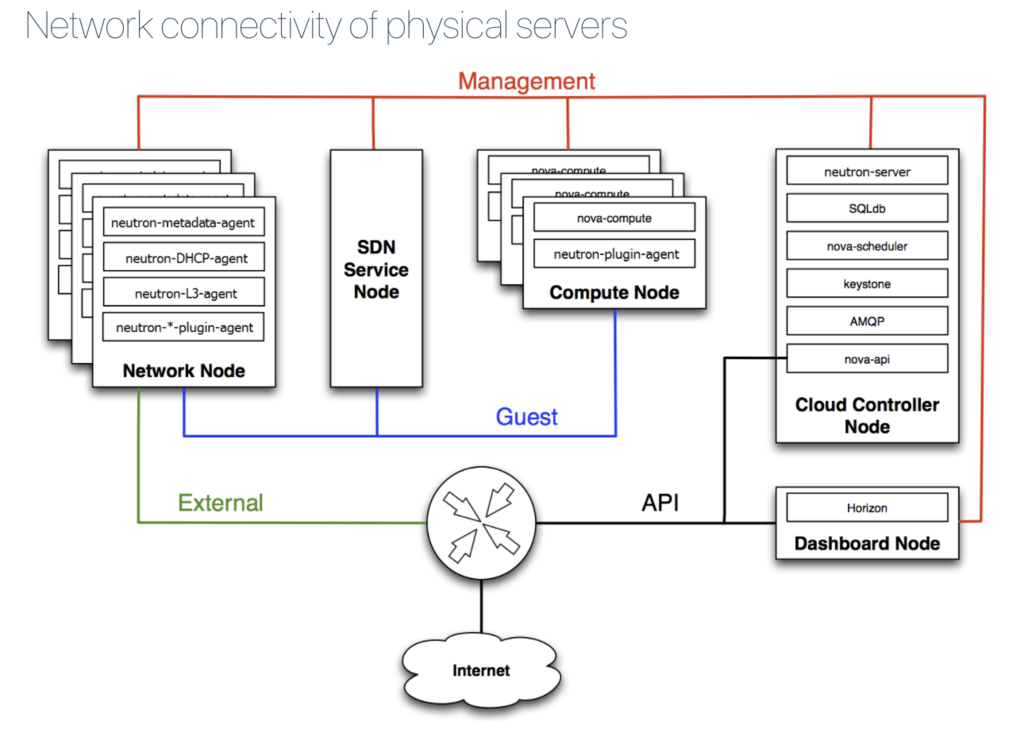
OpenStackメモ
OpenStackデプロイツールについて
RHELではRHEL-OSP Directorがあり。
これはTripleo(OpenStack on OpenStack)がベース。
OpenStack Docs: TripleO Architecture
手動構築でコントローラ冗長化実現し、仕組みを把握してからやる。
UbuntuではConjure-up
www.ubuntu.com
セキュリティガイド
各コンポーネント向けのセキュリティ対策設定の説明あり
OpenStack Docs: OpenStack Security Guide
